Shipping is a major part of running any home-based business — whether you sell on Etsy, eBay, Shopify, TikTok Shop, Facebook Marketplace, or ship orders directly to customers. Slow printers, blurry labels, or endless jams can quickly turn a productive day into frustration.
A reliable thermal label printer saves time, cuts costs, and keeps packages moving out the door fast.
We reviewed top-rated printers trusted by real small business owners and compared speed, compatibility, and long-term cost. Below are the best choices depending on budget, workflow, and how many orders you ship each week.
Tip: Look for 4×6 thermal label compatibility
This format is the shipping standard for USPS, UPS, and FedEx — and thermal printers use no ink.
This article contains affiliate links. As an Amazon Associate, I earn from qualifying purchases.
Quick Picks (if you want the fast answer):
| Best for… | Model | Why | Check price |
|---|---|---|---|
| Most home businesses | Rollo Thermal Printer | Fast + super reliable | Rollo USB Shipping Label Printer |
| Mac users | Munbyn ITPP941 | Hassle-free setup on macOS | MUNBYN Bluetooth Thermal Label Printer 941B |
| Small budgets | iDPRT SP410 | Usually under $100 | iDPRT Bluetooth Thermal Shipping Label Printer |
| High volume / growing shops | Rollo Wireless | Faster batches + no cables | Rollo Wireless Shipping Label Printer |
Why Home Businesses Should Choose Thermal Printers?
Inkjet printers are fine for a few labels — but expensive to run every week.
Thermal printers use heat-activated labels, so:
- No ink cartridges
- Smudge-proof labels
- Better barcode scanning
- Faster shipping days
| Printer Type | Ink Cost per 100 Labels | Yearly Cost (3,000 labels) |
|---|---|---|
| Inkjet | $6–$14 | $180–$420 |
| Thermal | $0 | $0 |
Thermal wins every time. Especially during holiday rush.
How We Picked These Printers
| Category | What Matters |
|---|---|
| Print Quality | Barcodes scan the first time |
| Speed | Batch orders without slowing down |
| Device Support | Mac, Windows, phones, shipping apps |
| Reliability | No overheating or constant jams |
| Total Cost | Printer + labels = real cost |
We also collected insights from thousands of real home-business reviews.
Best Label Printers for Home-Based Businesses
Best Overall: Rollo Thermal Printer
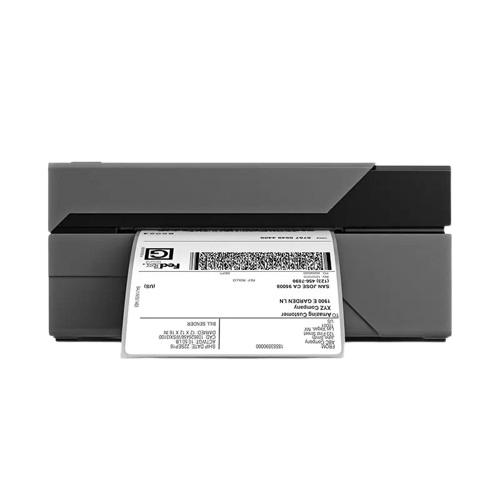
★ ★ ★ ★ ★ 9.6/10 — Best for most home businesses
Why we like it:
- Super fast printing
- Works with cheaper fan-fold labels
- Huge support community + guides online
- Compatible with Etsy, eBay, Shopify, ShipStation, Pirate Ship
Specs:
- Speed: 150 mm/s
- Connection: USB (wireless version also exists)
Best for: Shops shipping 10–50+ orders/week
Best for Mac Users: Munbyn ITPP941
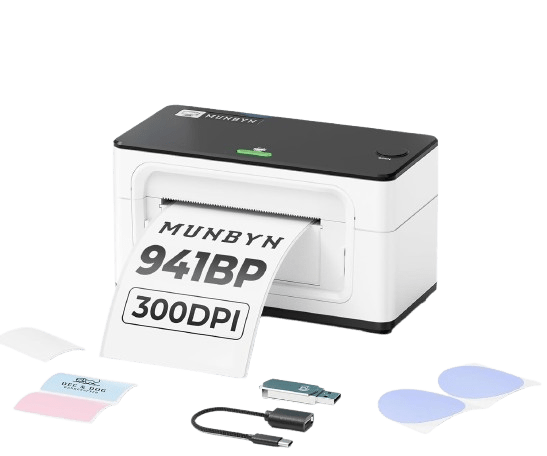
★ ★ ★ ★ 9.2/10 — Best for Mac-based home businesses
Why it stands out:
- Easy driver setup for macOS
- Crisp label edges + strong print head
- Affordable quality
Specs:
- Speed: 150 mm/s
- USB plug-and-print
Best for: Mac-based workflows + holiday sellers
Best Budget Pick: iDPRT SP410
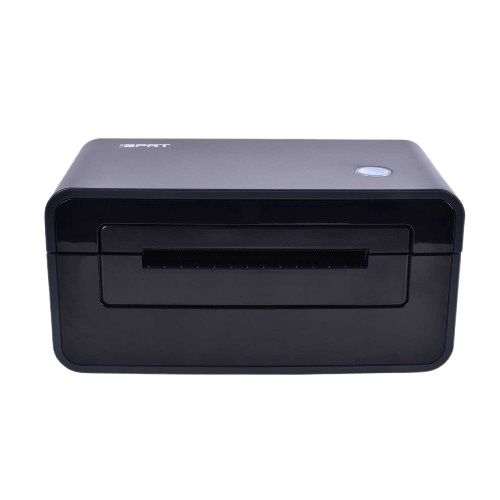
★ ★ ★ 8.7/10 — Best for new or small shops
Why it’s great for new or small shops:
- Simple setup + starter labels included
- Perfect for lower order volume
Specs:
- Speed: 72 mm/s
- Compact size
Best for: <10 orders/week or business testing stage
Best for High Volume: Rollo Wireless
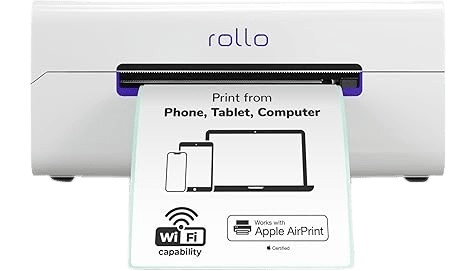
★ ★ ★ ★ ★ 9.4/10 — Best for scaling businesses
Why upgrade:
- Wireless: no desk clutter
- Connects to multiple devices
- Great for batch shipping sessions
Best for: Growing shops and busy seasons
Comparison Chart
| Model | Speed | Best For | Mac? | Price | Rating |
|---|---|---|---|---|---|
| Rollo USB | ★ ★ ★ ★ ★ | Most sellers | ✔ | $$ | 9.6/10 |
| Munbyn 941 | ★ ★ ★ ★ | Mac workflows | ✔ | $$ | 9.2/10 |
| iDPRT SP410 | ★ ★ ★ | New sellers | ✔ | $ | 8.7/10 |
| Rollo Wireless | ★ ★ ★ ★ ★ | High volume | ✔ | $$$$ | 9.4/10 |
Price: $ = budget, $$$$ = premium
Do You Also Need a Scale?
Probably yes.
Even a tiny weight mistake can cause:
- USPS charges to customers (bad reviews)
- Returned packages (lost time + money)
Best beginner bundle:
Rollo USB + 50 lb scale = accurate + low cost
Which Printer Should You Get?
| Stage | Pick This |
|---|---|
| Just starting (<10 orders/week) | iDPRT SP410 |
| Getting consistent sales | Rollo |
| Mac-only setup | Munbyn 941 |
| Full-time + high volume | Rollo Wireless |
Don’t overbuy. Upgrade only when orders demand it.
FAQ
Q: Can I use my inkjet printer?
A: Yes — but smudging + ink cost becomes a problem fast.
Q: Does this work with USPS + UPS?
A: Yes — all support standard 4×6 labels.
Q: Is setup hard?
A: If you can print a document, you can set this up.
Q: What labels should I buy?
A: Fan-fold labels — they jam less and cost less.
Conclusion
A reliable label printer can save hours every month — and money on ink. Pick based on where your business is today:
- Most businesses → Rollo USB
- Mac-focused studios → Munbyn 941
- On a tight budget → iDPRT SP410
- High-volume shipping → Rollo Wireless
The right tool helps you ship faster, so you can focus on growing your business
Tools That Make Home Shipping Easy
Tools That Make Home Shipping Easy
This article contains affiliate links. As an Amazon Associate, I earn from qualifying purchases
 HomeShippingTools
Leave a comment